Our advice: arrange it before 1 December. 14 days left. Get started for 2026
Where is the EAN code on a NieuweStroom invoice?
On a monthly invoice from NieuweStroom the EAN code is on page 1 of 4, halfway down on the left. Your name or company name is on page 1, at the top left.
Contents
NieuweStroom invoice
On a monthly invoice from NieuweStroom the EAN code is on page 1 of 4, halfway down on the left. Your name or company name is on page 1, at the top left.
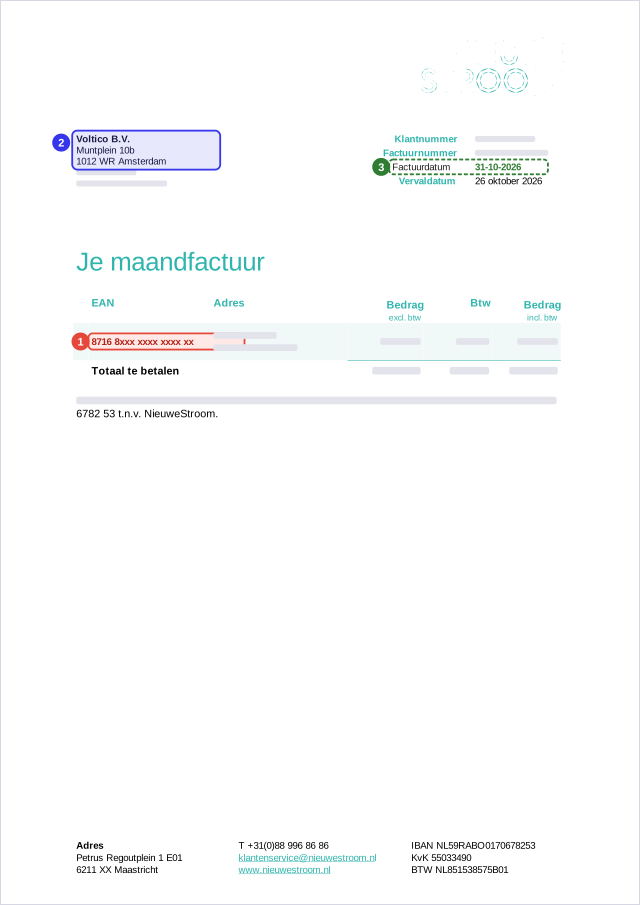
Example: rebuilt from real invoices. Name and address are Voltico's, the EAN code is a sample number and amounts are left out. Voltico is not affiliated with the suppliers shown.
Another supplier
What to look for
EAN code. The number of your electricity connection: 18 digits, usually starting with 871. Two of them? Use the one for electricity, not gas.
Name. The name on the bill must match whoever signs up: your name, or the name your company has in the KvK.
Invoice date. No older than 12 months for a small-consumption connection, no older than 2 months for large consumption.
Do you recognise the EAN code?
- An EAN code has 18 digits and usually starts with 871. A 13-digit code is not the right one.
- Two EAN codes on the bill? Use the one for electricity, not the one for gas.
- Some suppliers print the EAN code on a later page. Always upload the full PDF.
Large consumption? The grid operator invoice too
For a large-consumption connection the portal also asks for your grid operator's invoice after your energy bill, no older than 2 months. This is what it looks like:
Is your supplier not listed?
Look on your bill for an 18-digit number that usually starts with 871, often labelled EAN, EAN code or connection. Still stuck? Email support@voltico.nl and we will help you.