Our advice: arrange it before 1 December. 14 days left. Get started for 2026
Where is the EAN code on a Liander invoice?
This is the invoice from your grid operator. You only upload it for a large-consumption connection, next to your energy bill. On a monthly invoice from Liander the EAN code is on page 2 of 2, at the top left. The name is on page 1, at the top left.
Contents
Liander invoice
On a monthly invoice from Liander the EAN code is on page 2 of 2, at the top left. The name is on page 1, at the top left.
The EAN code is only on page 2. So upload the whole PDF, not just the first page.
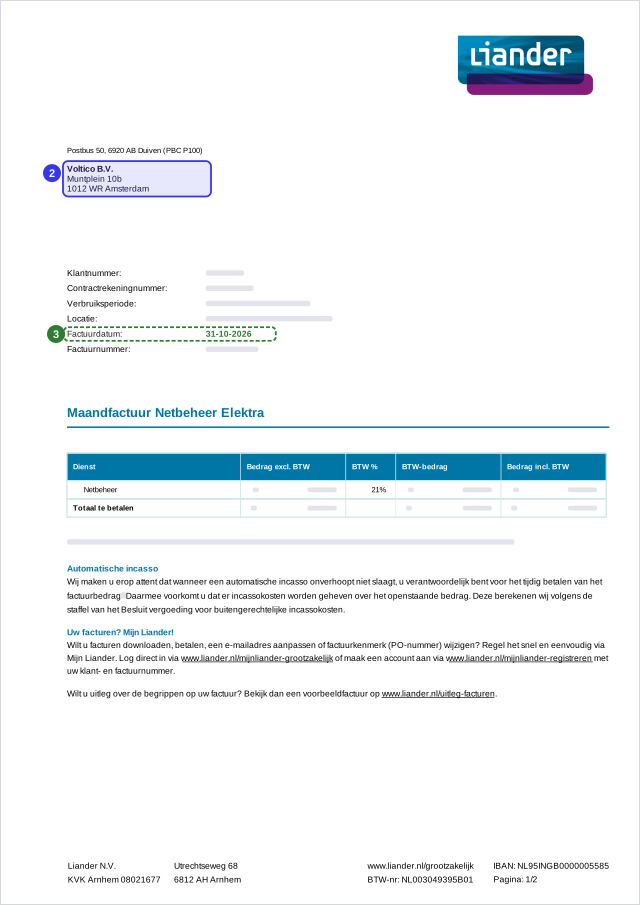
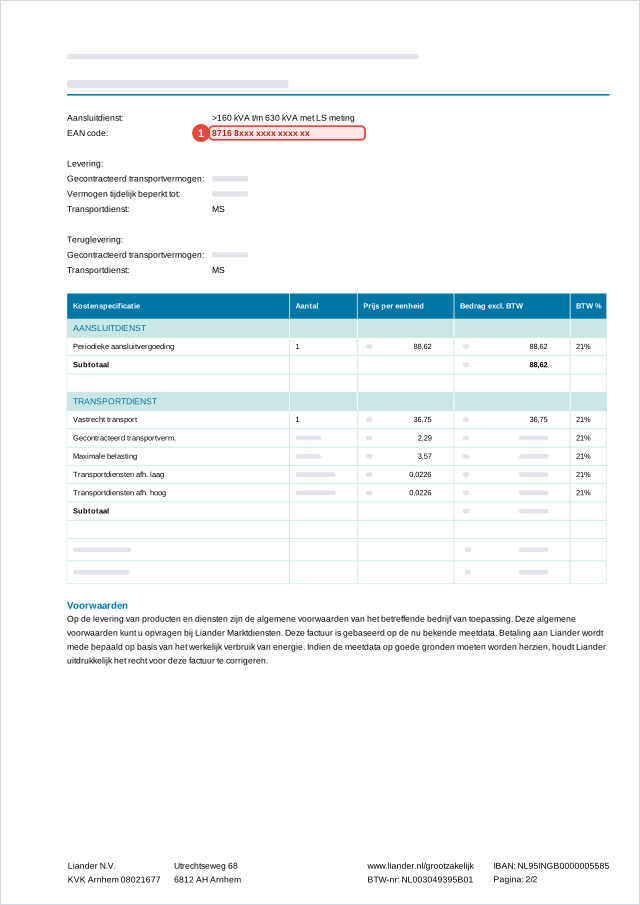
Example: rebuilt from real invoices. Name and address are Voltico's, the EAN code is a sample number and amounts are left out. Voltico is not affiliated with the suppliers shown.
Another grid operator
What to look for
EAN code. The number of your electricity connection: 18 digits, usually starting with 871. Two of them? Use the one for electricity, not gas.
Name. The name on the bill must match whoever signs up: your name, or the name your company has in the KvK.
Invoice date. No older than 12 months for a small-consumption connection, no older than 2 months for large consumption.
Do you recognise the EAN code?
- An EAN code has 18 digits and usually starts with 871. A 13-digit code is not the right one.
- Two EAN codes on the bill? Use the one for electricity, not the one for gas.
- Some suppliers print the EAN code on a later page. Always upload the full PDF.
Is your supplier not listed?
Look on your bill for an 18-digit number that usually starts with 871, often labelled EAN, EAN code or connection. Still stuck? Email support@voltico.nl and we will help you.